
HTML5 - Music Player
Audio5 in action
Product Price:
Preferred payment method: Pay with Paypal / Credit Cards - After payment you will be redirected to a direct-download page and the download link will be emailed to the payment address.
Product Features
- Great portability to the different web browsers. It can be used in the new browsers, that supports HTML5 standard and previous browsers with Flash player installed. Including the browsers in mobiles.
- Visual adaptability. The visual interface of the music player can easily be modified through the Audio5.css file.
- Intuitive configuration and use. Audio5 is distributed as a Adobe Dreamweaver extension, its installation and use is completely guided through the setup wizard.
- Audio5 has very practical controls to manage the audio playback. Among the playback controls available are: play/pause button, a progress bar, mute button, and a volume control.

Audio5 details
- Screenshots and Video Tutorials
- Requirements and Installation
- Use Description and Tips
- Files' Formats Supported
- Frequently Asked Questions
- Reviews and User Opinions
Audio5 Interface

- Play/Pause button.
- The seek bar and button for jump to different sections of song.
- Elapsed time.
- Duration of audio.
- The Mute ON/OFF button.
- The volume control.
The HTML5 standard today is imposing rapidly in the most used web browsers. Among the new labels that have been included in the new standard we put the emphasis on the <AUDIO> label.
The <AUDIO> label allows you to incorporate raw audio features into your website without using third party software as Quicktime or Flash player.
Unfortunately not all the web browsers support HTML5 yet. To name an example Internet Explorer will be able to support HTML5 from version 9 on, which brings us to the conclusion that a mixed audio setup in between HTML5 and Flash will need to be set in place to accommodate our user's web browser of preference.
Our music player, Audio5, fulfills both tendencies. The audio player verifies if the web browser supports HTML5 standard or Flash, and play the audio file in the required standard.
Screenshots for insertion process

Video Tutorial
Audio5 Requirements
 Adobe Dreamweaver MX 2004 and superiors. (Only if you are inserting the Audio5 music player as a Dreamweaver extension)
Audio5 Installation
The distribution package of Audio5 has two folders inside:
- The Demo folder that includes a functional music player to be inserted directly in the website.
- The Dreamweaver extension folder, to install the audio player from Dreamweaver application (It is the easiest way to install Audio5. Recommended mode).
To publish the audio player directly follows the steps below:

<link rel="stylesheet" href="/demo/audio5/styles/audio5.css" type="text/css">
<script src="/demo/audio5/javascript/jquery-1.4.2.min.js"></script>
<script src="/demo/audio5/javascript/audio5.js"></script>
<div class="shadow audio5">
<audio class="audio5" autoplay loop controls="true" width="300">
<source src="/demos/resources/audio.wav"></source>
<source src="/demos/resources/audio.mp3"></source>
</audio>
<object type="application/x-shockwave-flash" data="audio5/audio5.swf?load=resources/audio.mp3&autoplay=1&loop=1" id="FlashID"
width="300" height="1" class="CodePeople">
<param name="movie" value="/demos/audio5/audio5.swf?load=/demos/resources/audio.mp3&autoplay=1&loop=1" />
<param name="quality" value="high" />
<param name="wmode" value="transparent" />
<param name="AllowScriptAccess" value="always"/>
</object>
</div>
The music player may be configured to be autoplay or play the song in a loop:
<audio controls="true" width="300px" class="audio5" autoplay loop >...
In the music player is possible to define multiple versions of the song to be sure that Audio5 is supported by all browsers.
Notice: not all browsers support the same audio files' formats
To insert multiple audio files insert a <source> tag for each file
<source src="/resources/audio.mp3"></source>
<source src="/resources/audio.wav"></source>
<source src="/resources/audio.ogg"></source>
... as Dreamweaver extension
The extension has been developed to be installed in Adobe Dreamweaver MX 2004 and superior versions. To install the Music Player as a Dreamweaver extension follows the steps below.
After install the Music Player extension you must to restart the Adobe Dreamweaver application.
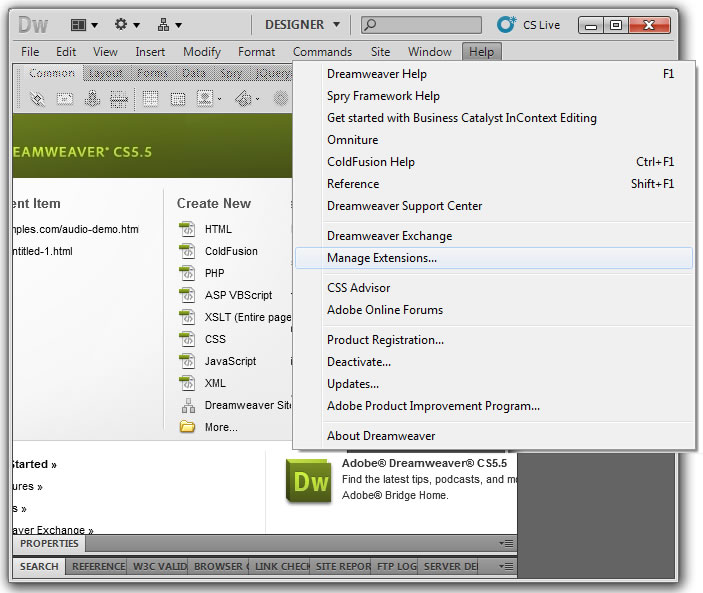
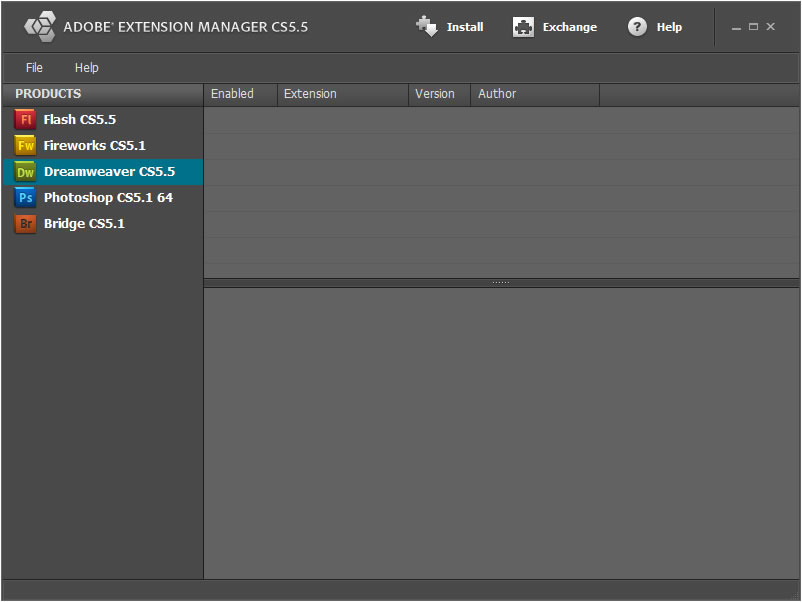
Audio5 may be inserted manually in the website or using a the Adobe Dreamweaver extension. The last way is the recommended because the process is very straightforward and intuitive.
Inserting Audio5 directly without Dreamweaver
To insert Audio5 manually in the website require a little more of work, but following the next instructions the process is facilitates:
<link rel="stylesheet" href="/demo/audio5/styles/audio5.css" type="text/css">
<script src="/demo/audio5/javascript/jquery-1.4.2.min.js"></script>
<script src="/demo/audio5/javascript/audio5.js"></script>
<div class="shadow audio5">
<audio class="audio5" autoplay loop controls="true" width="300">
<source src="/demos/resources/audio.wav"></source>
<source src="/demos/resources/audio.mp3"></source>
</audio>
<object type="application/x-shockwave-flash" data="audio5/audio5.swf?load=resources/audio.mp3&autoplay=1&loop=1" id="FlashID"
width="300" height="1" class="CodePeople">
<param name="movie" value="/demos/audio5/audio5.swf?load=/demos/resources/audio.mp3&autoplay=1&loop=1" />
<param name="quality" value="high" />
<param name="wmode" value="transparent" />
<param name="AllowScriptAccess" value="always"/>
</object>
</div>
The music player may be configured to be autoplay or play the song in a loop:
<audio controls="true" width="300px" class="audio5" autoplay loop >...
In the music player is possible to define multiple versions of the song to be sure that Audio5 is supported by all browsers.
Notice: not all browsers support the same audio files' formats
To insert multiple audio files insert a <source> tag for each file
<source src="/resources/audio.mp3"></source>
<source src="/resources/audio.wav"></source>
<source src="/resources/audio.ogg"></source>
Audio5 as an Adobe Dreamweaver extension
Audio5 as Dreamweaver extension allows to share easily the audio files through the web and hardly any web development skills.
First, open the page where the Audio5 will be inserted, in Adobe Dreamweaver.
Notice: the webpage must be previously saved and the website correctly defined.
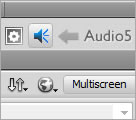
Then press the option menu: "Insert/Insert Audio5" or through the "Insertion Bar" in the "Common" category(figure 1), to display the insertion setup.

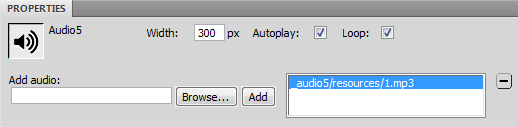
The insertion setup allows to define the music player width, the source files and other configuration options. The interface (figure 2) is described below:
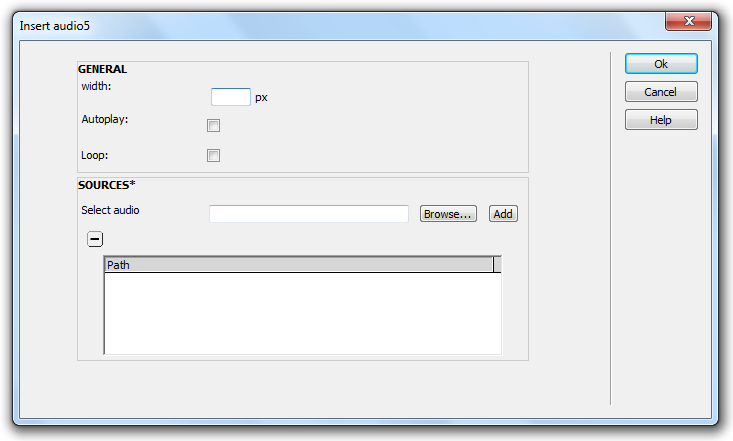
width: defines the music player width in pixels.
autoplay: starts the audio playback after download the webpage. Pay attention, in some Apple gadgets (iPhone, iPad, iPod, etc.) the autoplay behavior is disabled.
loop: the audio file will be played in a infinite loop. Pay attention, in some badgets the loop is disabled.
sources: the Audio5 player don't accept a classic playlist, it allows to enter the location of multiple files' formats of same song. That's because the browsers have support for different files' formats.
After complete the Audio5 setup, press the OK button.
The insertion process generates a new folder titled "audio5" in the website's structure.
Formats of Audio files supported by Audio5
The files extensions supported by Audio5 depends on the web browser where it is playing. Below a chart with the audio formats supported by each web browser.
| Browsers | Audios' Formats |
|---|---|
| Chrome 4 |
.m4a .oga .mp3 |
| Firefox 3.6 |
.wav .oga |
| Opera 10.5 |
.wav .oga |
| Safari 4 |
.m4a .wav .mp3 |
| Flash | .mp3 |
HTML5 standards are taking more and more space among the new generation of web browsers, still we are in transition stage where many web browser do not support new standards as HTML5 and that is what makes Audio5 a great tool for those who wish to share their audio files with a world wide user community.
Not all the current web browsers support the HTML5 Standard. Below we offer you a list of web browsers that support the HTML5 audio tag. The rest of browsers use the Flash based music player.
- Chrome 4
- Firefox 3.6
- Safari 4
- Opera 10.5
- Internet Explorer 9
Frequently Asked Questions
This questions are related with the Audio5, if you want to read the questions about another product, go to the product's page or the FAQ section in the main menu at top of the web page.
Select a question to access to the answer.
Answers
Why the loop feature is not working in my iPad?
The loop feature was disabled by Apple from all gadgets that use the IOS operating system.
Go to the questions listWhy the Autoplay is not working in the iPhone?
The autoplay behavior was intentionally disabled by Apple:
In Safari on iPhone OS (for all devices, including iPad), where the user may be on a cellular network and be charged per data unit, autobuffering and autoplay are disabled. No data is loaded until the user initiates it. This means the JavaScript play() and load() methods are also inactive until the user initiates playback, unless the play() method is triggered by user action.
Go to the questions listI want to modify the music player appearance. How can I to replace the images in the css file?
If you load the audio5.css file in a text editor is easy to note that images were embed in the style's file using the mime format.
It is very important reducing the number of connection from mobiles devices, so embed the images in the style file reduces the connections numbers, but if you want to replace the interface's graphics, the process is very simple:
For example if you want to modify the background of controls bar, in the class:
.audio5 .ctrls-container{height:25px;background:url("data:image/png;charset=utf-8;base64,
replace:
iVBORw0KGgoAAAANSUhEUgAAAAEAAAAZCAQAAABamYz0AAAAGXRFWHRTb2Z0d2FyZQBBZG9iZSBJbWFnZVJlYWR5c
cllPAAAAB5JREFUCFtjYNjM4PuK6e4fJgYGpv8w9A+VgYtERQCohRjXSe7wEwAAAABJRU5ErkJggg==") repeat-x scroll 0 0 transparent;}"data:image/png;charset=utf-8;base64,iVBORw0KGgoAAAANSUhEUgAAAAEAAAAZCAQAAABamYz0AAAAGXRFWHRTb2Z0d2FyZQBBZG9
iZSBJbWFnZVJlYWR5ccllPAAAAB5JREFUCFtjYNjM4PuK6e4fJgYGpv8w9A+VgYtERQCohRjXSe7wEwAAAABJRU5ErkJggg=="by the URL of image to use as background.
Go to the questions list
Professional Reviews
Mr. Brown Junior
The number of users that consume information through mobiles devices today has increased considerably. The idea of combined products, capable of interact with the traditional browsers and the actual mobile browsers, has imposed over the previous products (only supported by desktop browsers).
There are some manners to obtain similar results. For example, detect the browser where the webpage has been loaded, and insert an <audio> tag if the HTML5 standard is supported by the browser. This solution has various inconvenient; every browser has a particular interface for the <audio> tag that maybe are not compatible with your website design. Another inconvenient is the requirement of a flash based music player to use in browsers that has not HTML5 support.
With both principles in mind: A music player capable to be used in all browsers and sharing the same interface, I have found Audio5, a very simple music player with basic controls; but a powerful product, tested in diverse situations. The Audio5 music player can be modified through a style file allowing me to adapt this product to a lot of projects.
Resuming, Audio5 is a music player that I recommend to my colleagues and friends.
Users Opinions

Christine Jenkins - Writer
I have checked this music player in ab iPad, with iOS as operative system with excellent results. Some features are disabled in my Tablet: The autoplay and loop are two of them, reading in the Apple website, I have found that these features have been removed by the manufacturer.

Justin Edwin - Engineer
The Audio5 is a perfect hybrid music player, it has the same behavior in the IE8 and the Chrome browsera, I have checked too in my Mac with similar results. In IE the music player uses the Flash player but in the rest of browsers use the native controls.

Luke Thomson - Entrepreneur
The Audio5 music player is very thin and with serious colors, wonderful for all type of websites' designs especially to use in background sounds, because the music player is not the most relevant attention point it is no compete with main sections of the website.

Ian Grey - Designer
With little of knowledge, about cascading style sheet, is possible to modify the designs of music player to adjust it to the website. Pay attention, Audio5 embeds the images as mime in the CSS file to reduce the number of connections to the server resources.