Video5 - Video Player verifies that the browser supports HTML5 and plays the video according to the HTML5 standard, otherwise it uses a player based on Flash.
In both cases it maintains the same visual presentation so that the final user does not realize the difference in formats during playback.
Video5 in action
$29.99 Product Price:
Preferred payment method:
Pay with Paypal / Credit Cards - After payment you will be redirected to a direct-download page and the download link will be emailed to the payment address.
Product Features
Great portability by browsers: uses HTML5 language as well as FLASH. Including the browsers in mobiles.
Adaptability: the player's interface can be modified quite simply by modifying the styles in the Video5.css file.
Easy intallation and use: Video5 is distributed with an extension for Adobe Dreamweaver. Its installation is 100% visual through a wizard or a setup window.
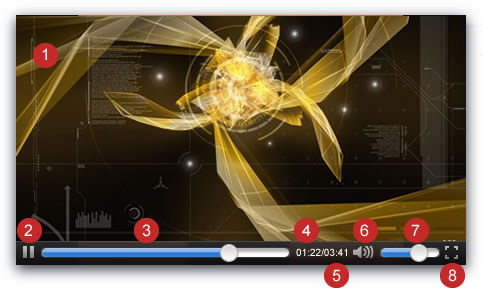
Handy controls to manipulate the video during playback: play/pause button, position bar, mute button, volume control, and finally, a Switch-to-Full-Screen button.
The seek bar and button for jump to different sections of movie.
Elapsed time.
Duration of movie.
The Mute ON/OFF button.
The volume control.
The full-screen button.
The popularity of online videos is on the rise, now also spreading to mobile devices such as smartphones, tablets, etc. Nowadays these devices support videos in several formats. Before, the solution was simpler: there was a common format (FLV), while Flash-based applications were used for playback. At this time, many mobile devices stopped supporting Flash and decided to use a new HTML standard, the HTML5.
Our product, Video5 video player, is a solution that complies with both tendencies. The video player first verifies that the browser supports HTML5 and plays the video according to the HTML5 standard, otherwise it uses a player based on Flash. In both cases it maintains the same visual presentation so that the final user does not realize the difference in formats during playback.
Adobe Dreamweaver MX 2004 and superiors. (Only if you are inserting Video5 as a Dreamweaver extension)
Video5 Installation
The distribution package of Video5 has two folders inside:
The Demo folder that includes a functional video player to be inserted directly in the website.
The Dreamweaver extension folder, to install the video player from Dreamweaver application (It is the easiest way to install Video5. Recommended mode).
To publish the video player directly follows the steps below:
1
Unzip the distribution package and upload the content of directory "demo" to your website. In our tutorial the content of "demo" directory was uploaded to the website root, if you are using another location, the paths of files must be corrected.
2
Copy the snippet of code below and paste it into the <head> section of web page.
The video player may be configured to display or not the video controls, the behavior of video player may be autoplay or play the movie in a infinite loop:
The extension has been developed to be installed in Adobe Dreamweaver MX 2004 and superior versions. To install the Video Player as a Dreamweaver extension follows the steps below.
1
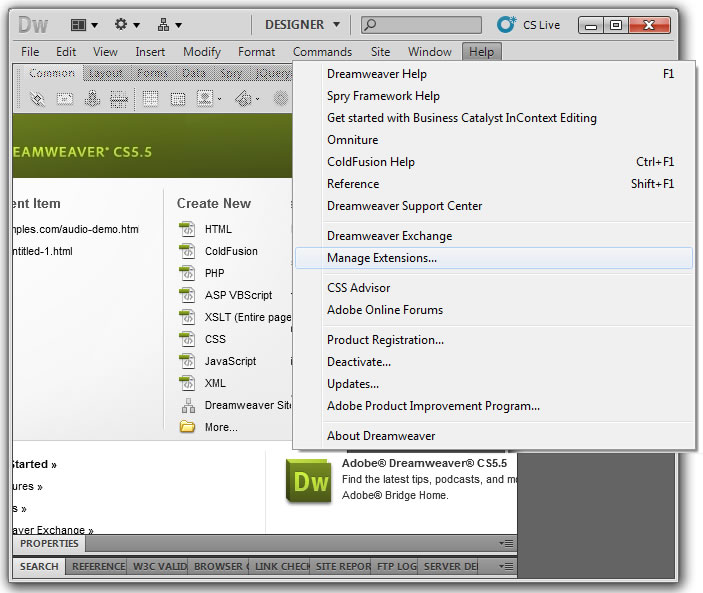
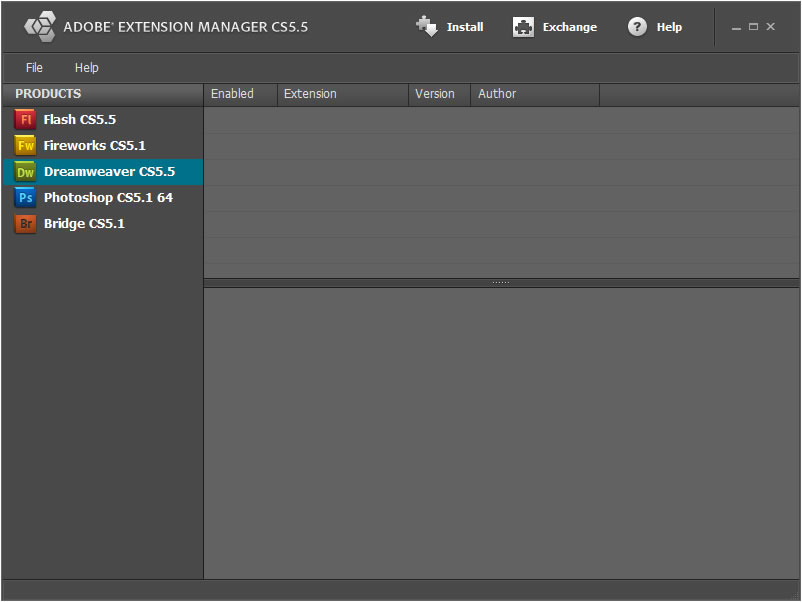
Execute the Adobe Extension Manager to install Dreamweaver extensions. Adobe Extension Manager is distributed with the Adobe Dreamweaver for Free (If you don't have installed the Adobe Extension Manager download the installation FROM HERE). Press the menu option: "Files/Install Extension" and enter the location to the .mxp file associated to the video player.
After install the Video Player extension you must to restart the Adobe Dreamweaver application.
Video5 may be inserted manually in the website or using a the Adobe Dreamweaver extension. The last way is the recommended because the process is very straightforward and intuitive.
To insert Video5 manually in the website require a little more of work, but following the next instructions the process is facilitates:
1
Unzip the distribution package and upload the content of directory "demo" to your website. In our tutorial the content of "demo" directory was uploaded to the website root, if you are using another location, the paths of files must be corrected.
2
Copy the snippet of code below and paste it into the <head> section of web page.
The video player may be configured to display or not the video controls, the behavior of video player may be autoplay or play the movie in a infinite loop:
Video5 as Dreamweaver extension allows to share easily the video files through the web and hardly any web development skills.
First, open the page where the Video5 will be inserted, in Adobe Dreamweaver.
Notice: the webpage must be previously saved and the website correctly defined.
Then press the option menu: "Insert/Insert Video5" or through the "Insertion Bar" in the "Common" category(figure 1), to display the insertion setup.
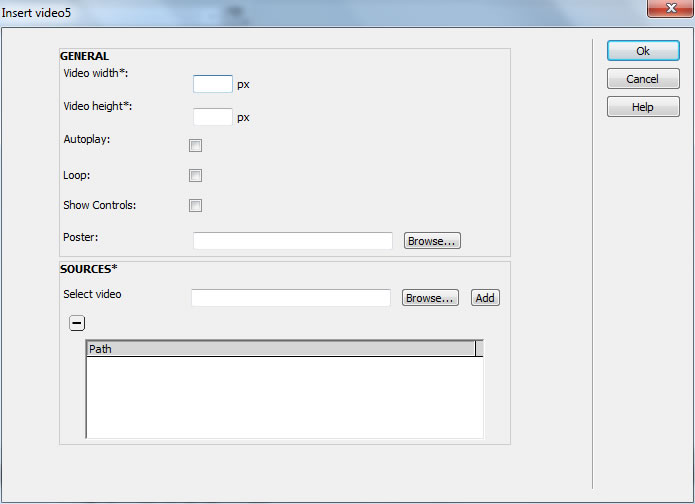
The insertion setup allows to enter the video player size, the movie's poster, the source files, the autoplay behavior, display de video controls or not and playback of movie in an infinite loop.. The interface (figure 2) is described below:
Video width: defines the video player width in pixels.
Video Height: defines the video player height in pixels.
Autoplay: starts the video playback after download the webpage. Pay attention, in some Apple gadgets (iPhone, iPad, iPod, etc.) the autoplay behavior is disabled by the manufacturer.
Loop: the video file will be played in a infinite loop. Pay attention, in some badgets the loop is disabled.
Show Controls: display or not the video player's controls.
Poster: enter the location of a JPG file. The poster will be displayed while the video is loaded.
Notice: in the Flash version, the poster is not shown.
Sources: enter the URLs of the video to be played. You can enter several URLs in this option, but it does not mean that they will be played back one after another like in a playlist. Browsers support different video formats, which is why it is recommended to enter as many versions of the same video in different formats as necessary to comply with most browsers. Video5 will take care of selecting the right video version depending on user's browser. When you enter a video in FLV or MP4 format, a flash player will be inserted into the web page, which will be shown only if the user's browser doesn't support HTML5.
After complete the Video5 setup, press the OK button.
The insertion process generates a new folder titled "video5" in the website's structure.
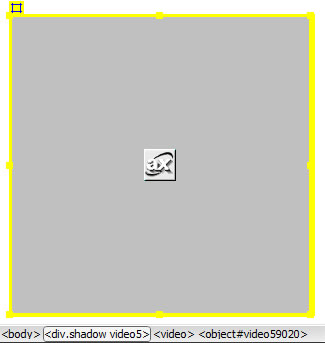
The configuration options, movies and porter may be modified selecting the related tag in the webpage (figure 3) and varying the options values in the properties inspector (figure 4).
The files extensions supported by Video5 depends on the web browser where it is playing. Below a chart with the video formats supported by each web browser.
Browsers
Videos' Formats
Chrome 4
.ogg
H.264
Firefox 3.6
.ogg
Opera 10.5
.ogg
Safari 4
H.264
Internet Explorer 9
H.264
Flash
FLV, H.264, MP4, F4V and other formats depending on user's flash player.
Not all the current web browsers support the HTML5 Standard. Below we offers a list of web browsers that support the HTML5 video tag. The rest of browsers use the Flash based video player.
Chrome 4
Firefox 3.6
Safari 4
Opera 10.5
Internet Explorer 9
Frequently Asked Questions
This questions are related with the Audio5, if you want to read the questions about another product, go to the product's page or the FAQ section in the main menu at top of the web page.
Why my videos are shown in some browsers but not in others?
Not all browsers support the same video formats, for example Firefox can play OGV and Safari H.264, in all browsers with support for Flash player can be used the FLV format.
The recommendation is to define multiple tags in the video player, for different formats of the same video.
The autoplay behavior was intentionally disabled by Apple:
In Safari on iPhone OS (for all devices, including iPad), where the user may be on a cellular network and be charged per data unit, autobuffering and autoplay are disabled. No data is loaded until the user initiates it. This means the JavaScript play() and load() methods are also inactive until the user initiates playback, unless the play() method is triggered by user action.
My videos in FLV format are supported by all the computer's browsers (including Safari) but not in my iPhone with Safari too.
The FLV is a video format proprietary of Adobe, and supported by applications based in Flash. The Apple gadgets (iPhone, iPod and iPad) are restricted for flash player, so the FLV videos can't be the only one video source, if you want to share your information for iPhone's users.
Why in some versions of Internet Explorer, the interface of video player is a little different?
The main difference in the interface is relative to rounded corners. The rounded corners are achieved with the CSS 3.0 standard but some old versions of browsers have not support of CSS 3.0.
But don't worry about, the main features are all available and the tendency is to reject the obsolete browsers.
We are a small company that makes short movies of tours through the client businesses: markets, museums, houses, etc... An important phase of our business model is publication of movies in the clients' website, or constructing a webpage with the videos for them; both options require using a video player capable to playback movies in a browser.
The number of browsers has increased and their restrictions and possibilities are far from being the same. For example, the Firefox browser has support for a type of video and Safari for another. The same occurs with the video player technology, some browsers have support for HTML5 standard, and others for Flash based applications only. So, an essential issue for us was to find a video player able to satisfy all restrictions.
We got various video players, some of them free, available on the Internet, and we have analyzed the pros and cons of each, and importantly, determine the product to increase, in a short time, our ROI. At the end we opted for the Video5 video player for two reasons: Video5 has all the required features and is distributed as an extension for Adobe Dreamweaver, the last point was very important in our decision because we are video makers, not web development experts, and Dreamweaver is an easy web editor.
Users Opinions
Terry Ledesma - Journalist
I'm a journalist for a sports blog; usually I take videos for regional games and interviews with sports managers, using Video5 we have extended our blog other media platforms, such as mobiles, previously our readers has to use computers to access our information.
Travis Orloff - Web Developer
Video is a powerful informative platform in expansion: all my clients' projects include use of videos. I'm using Video5 in all my projects and the results can't be better. The video player's developers are very competent and the support is friendly and quick.


 Adobe Dreamweaver MX 2004 and superiors. (Only if you are inserting Video5 as a Dreamweaver extension)